Running Claude Code from my phone
December 22, 2025
Introduction
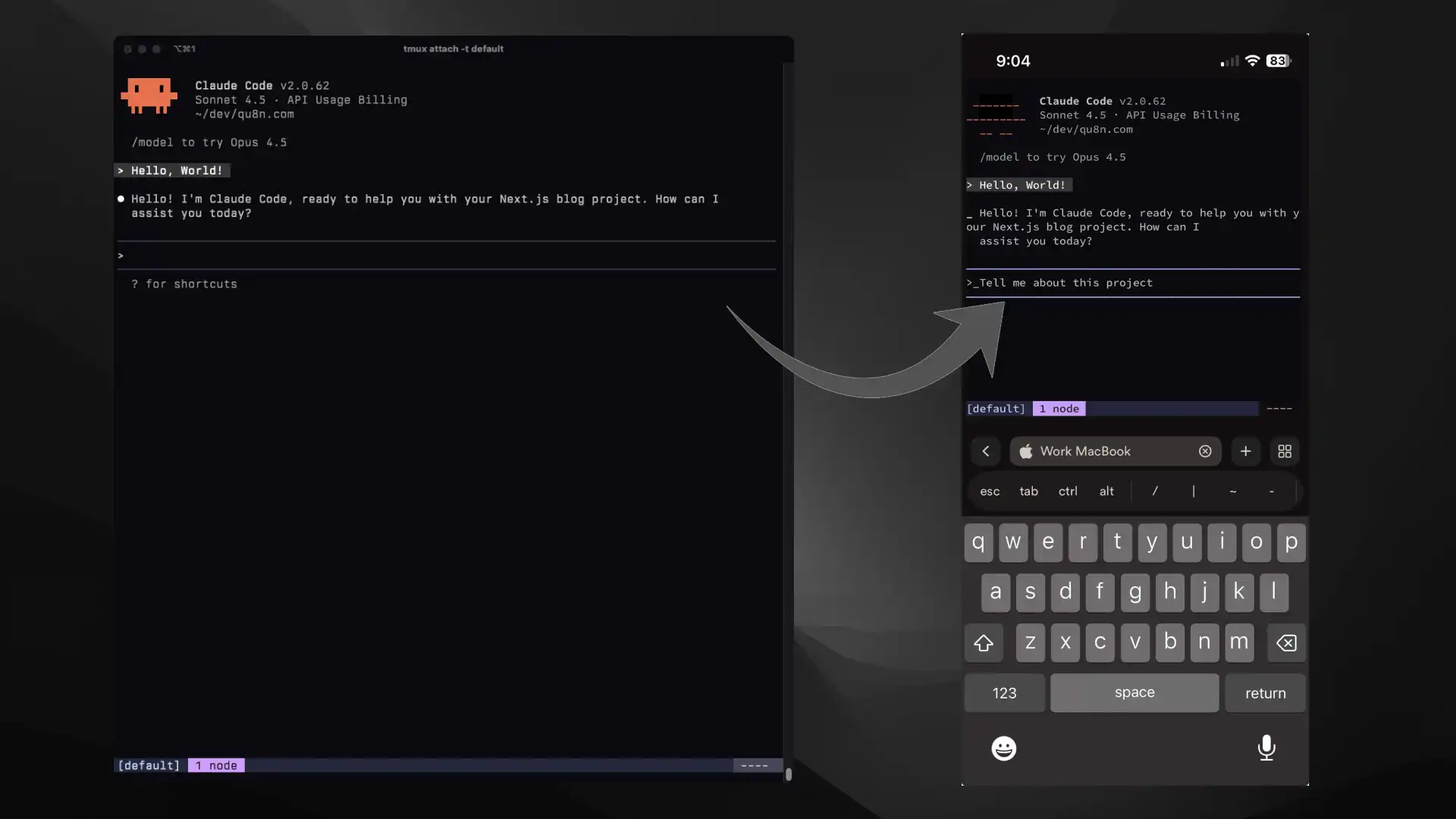
When I run Claude Code on a larger task, I often end up waiting on it while wanting to step away: coffee, a meeting, or a walk. I didn’t want to keep checking my laptop just to see whether it needed input or had finished.
Over the past month, I’ve been using a simple setup that lets me:
- keep Claude Code running on my Mac,
- attach to the same session from my phone,
- and get notified when it needs attention.
Because of tailscale + Claude opus/gpt 5.2 codex, my phone went from a demonic time wasting attention sink that I wanted to throw in a camp fire to the most productive tool I have
— kache (@yacineMTB) December 20, 2025
Mine is a simple workflow with SSH, tmux, and a couple of notification hooks, but it’s been reliable enough that I now use it almost daily.
This post documents my personal setup. If you’re on different devices or platforms, most of the ideas still apply.
Prerequisites
At a high level, the idea is:
- Claude Code runs on my Mac.
- tmux keeps the session alive.
- my phone SSHs in over Tailscale.
- Claude Code hooks send notifications when it stops or needs input.
Install the following tools on your Mac and/or iPhone:
| Tool to install | Mac | iPhone | Description |
|---|---|---|---|
| Claude Code | ✅ | Anthropic’s AI coding assistant | |
| tmux | ✅ | Access the same Claude Code session on your Mac and iPhone | |
| Tailscale | ✅ | ✅ | Secure the SSH connection between your Mac and iPhone |
| Termius | ✅ | SSH client for your iPhone to connect to your Mac | |
| terminal-notifier | ✅ | Get notifications on your Mac on Claude Code events | |
| ntfy | ✅ | Get push notifications on your iPhone on Claude Code events |
I chose this combination of tools based on my familiarity with them (like tmux), cost (Termius and ntfy have generous free tiers), and ease of use (Tailscale).
I also wanted to (1) share the same Claude Code sessions between devices and (2) get notified on both devices when Claude Code needs my attention.
Enable Remote Login on your Mac
This step allows your Mac to accept SSH connections from other devices, enabling your iPhone to connect to it remotely.
- On your Mac, choose Apple menu , then click System Settings.
- Click General ⚙️ in the sidebar, then click Sharing. (You may need to scroll down.)
- Click next to Remote Login.
- Turn on Remote Login.
- Turn on "Allow full disk access for remote users".
Set up Tailscale
Tailscale creates a VPN between your devices, protecting the SSH connection between your Mac and iPhone.
- Sign in with the same Tailscale account on both your Mac and iPhone.
- Turn on Tailscale on both devices.
- On your Mac, click on the Tailscale menu bar icon.
- Note your Mac's Tailscale IP address (it will look like
100.x.x.x). You'll use this IP address in the next step.
Set up Termius
Termius is an SSH client that lets your iPhone connect to your Mac's terminal, allowing you to control Claude Code remotely.
Generate a Termius SSH key
- On your iPhone, open Termius.
- Go to the "Keychain", and tap the add button (+), then "Generate Key".
- Tap "Save" to create the key with default settings.
- Tap on the newly created key, then export icon, and then "Copy Public Key". We'll use this in the next step.
Add the Termius key to Mac
-
Return to your Mac and create the
~/.ssh/authorized_keysfile if it doesn't exist:mkdir -p ~/.ssh && touch ~/.ssh/authorized_keys -
Ensure proper permissions:
chmod 700 ~/.ssh && chmod 600 ~/.ssh/authorized_keys -
Append the copied public key from Termius to the end of the
authorized_keysfile:echo "REPLACE_THIS_WITH_YOUR_TERMIUS_PUBLIC_KEY" >> ~/.ssh/authorized_keysYour Termius public key should look something like "ssh-ed25519 AAAA... Generated By Termius".
Add your Mac as a Host in Termius
- Return to Termius on your iPhone.
- Go to "Hosts", and tap the add button (+), then "New Host".
- Enter the following details and leave other fields as default:
- "Label": Any custom identifier for your Mac (e.g., "My Personal Mac").
- "IP or Hostname": Enter the Mac's Tailscale IP noted earlier (e.g.,
100.123.45.67). - "Username": Your Mac login username.
- "SSH.id, Key, Certificate, FIDO2": Select the SSH key generated earlier.
- Tap "Save", then "Connect".
Share the same Claude Code session
tmux lets us access the same terminal session from both the Mac and iPhone. You can start a Claude Code session on your Mac, then seamlessly switch to your iPhone to continue from exactly where you left off and vice versa.
Before connecting from your iPhone, create a tmux session on your Mac:
tmux new -s session_nameNext, navigate to your code directory and start Claude Code:
claudeYou can now work normally on your Mac. The tmux session persists in the background even if you close the terminal window.
Next, switch back to Termius on your iPhone and run:
tmux attach -t session_nameYou'll see the exact same session that's running on your Mac, with all history and state intact.
Both devices can now view and control the same Claude Code session simultaneously. Any commands you type on your iPhone will appear on your Mac in real-time, and vice versa.
Tip
New to tmux? Here are some handy commands:
- Create a new session:
tmux new -s session_name - Attach to a session:
tmux attach -t session_name - Detach from session:
Ctrl + b, thend - Create a new window (tab) within a session:
Ctrl + b, thenc - List sessions:
tmux ls - Kill session:
tmux kill-session -t session_name - See more in this cheat sheet
Set up notifications
Get notified on both your Mac and iPhone when Claude Code completes tasks or needs your attention.
Subscribe to a topic in ntfy
ntfy is a simple push notification service that works via HTTP. We'll use it to send notifications from Claude Code running on your Mac to your iPhone.
- On your iPhone, open the ntfy app.
- Tap the "+" button to add a new subscription.
- Enter a unique topic name (e.g.,
my-topic) and tap "Subscribe". If you use ntfy without sign-up, the topic is essentially a password, so pick something that's not easily guessable. If you purchase ntfy Pro, you can reserve topic names instead.
Configure Claude Code hooks
With Claude Code hooks, we can trigger custom commands when certain events occur. We'll set up hooks to send notifications when Claude Code needs input and when it finishes working.
- Add the following to your global Claude Code settings:
{
  "hooks": {
    "Notification": [
      {
        "matcher": "",
        "hooks": [
          {
            "type": "command",
            "command": "terminal-notifier -title \"🔔 Claude Code\" -message \"I need your input\" -sound default -activate 'com.googlecode.iterm2' && curl -d \"🔔 Claude Code: I need your input\" ntfy.sh/my-topic"
          }
        ]
      }
    ],
    "Stop": [
      {
        "matcher": "",
        "hooks": [
          {
            "type": "command",
            "command": "terminal-notifier -title \"✅ Claude Code\" -message \"I'm done!\" -sound default -activate 'com.googlecode.iterm2' && curl -d \"✅ Claude Code: I'm done!\" ntfy.sh/my-topic"
          }
        ]
      }
    ]
  },
}- Replace
my-topicin thecurlcommands with the topic name you subscribed to in ntfy. - I use iTerm2 as my terminal app. If you use a different one, replace
'com.googlecode.iterm2'with the appropriate bundle identifier obtained from runningosascript -e 'id of app "Insert app name"'. - The
commanddoes two things: (1) send a notification to your Mac usingterminal-notifier, and (2) send a push notification to your iPhone usingcurlto post to your subscribed ntfy topic. If you only want to be notified on one device, you can remove the other part of the command. - When you're done, save the settings file and restart Claude Code to apply the new settings.
Reflections
The biggest win isn’t coding from my phone. It’s not feeling glued to my desk while Claude works. I can walk away then engage when there’s something to do.
But this setup isn't perfect:
- Typing on the phone feels clunky for anything more than a quick response, although I suspect I could get faster with practice (see this NeoVim plugin author who wrote 25K+ lines of code on his phone).
- I'm usually in front of my laptop, so the phone notifications are often more distracting than helpful. I ended up disabling the ntfy notifications for now. What would be nice is more granular control over when and how I'm notified.
Share to X, Hacker News, LinkedIn